
WhatsApp Chatbot & Business Automation
- Home
- Business Software Solutions for Your Industry
- WhatsApp Chatbot & Business Automation

Automate Customer Conversations, Lead Management, and Business Workflows with WhatsApp
Turn eligible WhatsApp conversations into organized business workflows. Unity Infoway helps businesses plan chatbots for enquiries, guided support, lead qualification and updates, with clear handover to a person when automation is not enough.
Choose rule-based flows, business-specific AI assistance or a combination after reviewing the use case. Build around the official WhatsApp Business Platform or an authorized provider, with account readiness and provider requirements assessed before launch.
Are important enquiries buried in repeated conversations?
The goal is not to automate every reply. It is to make routine interactions useful while preserving a clear route to the right person.
The same questions consume staff time
Create clear answers or guided choices for known questions, with a fallback when the request falls outside the approved flow.
Lead details never reach the CRM
Capture the minimum relevant information and define how it becomes a lead, task or support record in the system of record.
Customers repeat their issue after handover
Pass the relevant conversation context to an assigned person so the next step does not start from zero.
Automation sends the wrong message at the wrong time
Define consent, event triggers, template use and stop conditions instead of treating every saved number as permission to message.
Discuss Your Business Automation Requirements

Connect the conversation to a useful next action
Plan the expected task and the escape routes. A good flow handles unclear answers, unavailable data and requests for human help.
Enter the conversation
Use an approved entry point and set expectations about the business and the interaction.
Understand the request
Offer guided choices or assess the query within the supported business scope.
Collect necessary details
Request only the information needed for the next action and validate it.
Connect the workflow
Create an authorized record, retrieve approved information or trigger a scoped action.
Handover when needed
Route exceptions or requested help to the appropriate person or support channel.
Review and improve
Monitor outcomes, failed flows and feedback without collecting unnecessary data.
Automation capabilities to scope around your business
Select the capabilities required for the approved use case. AI, shared inboxes, integrations and campaigns are separate design choices, not automatic platform inclusions.
Conversation design
Map intents, guided choices, fallbacks and the information needed at each step.
Enquiry capture
Collect agreed lead details and route them to the right team or business record.
Approved answers
Maintain business-specific responses with a clear process for reviewing changes.
Rule-based flows
Guide users through predictable tasks using explicit conditions and actions.
Optional AI assistance
Assess answers grounded in approved business content, with limits and human review.
Human handover
Define agent assignment, context transfer and an alternative support route.
Start with one eligible business task
A focused first use case is easier to validate than a bot expected to answer everything. Review industry eligibility before choosing features or outbound campaigns.
Sales enquiries
Qualify requests and create follow-up records using agreed fields.
Customer support
Answer known questions and route unresolved issues to people.
Order-related updates
Assess authorized lookups and notifications for eligible commerce workflows.
Service coordination
Collect requests or appointment details where the platform and provider permit the use case.
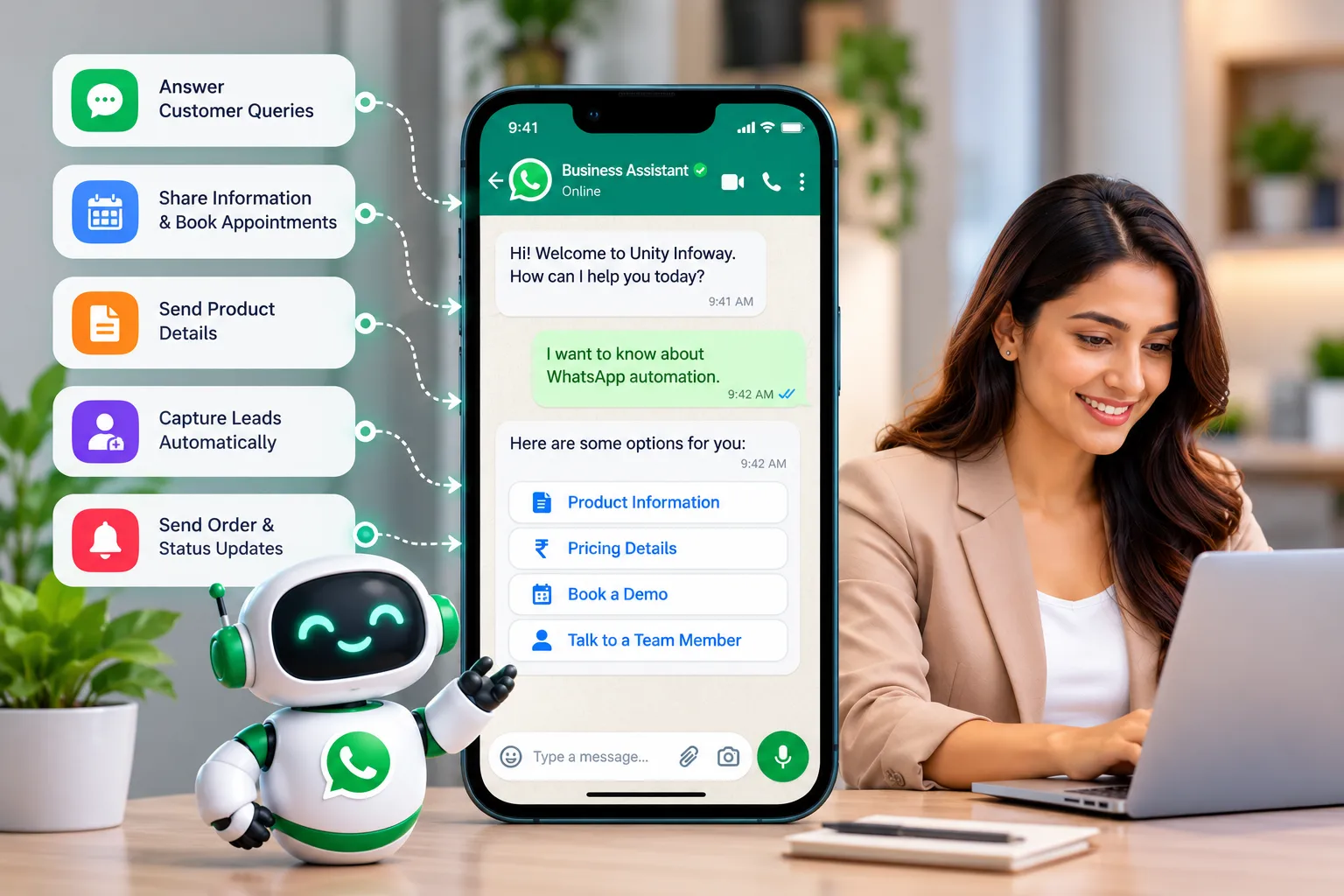
Connect useful actions, not unrestricted access
For business-specific interfaces and APIs, review custom web development. An existing Perfex installation may require Perfex CRM customization before the desired workflow is available. Keep access narrow, validate incoming events and record failures. An AI answer must not be treated as permission to change a booking, account or commercial record without the required checks.
Meta requires opt-in for subsequent contact and an accessible escalation route for automated responses. Outside the 24-hour customer service window, messages require approved templates. Provider approval, messaging limits and delivery are external dependencies; automation does not remove them.
Why work with Unity Infoway?
Define success as a useful, completed customer task rather than a large message count. Discuss IT support and maintenance for monitoring, content updates and the operating responsibilities of the selected implementation.
Explore related solutions
Manpower agency CRM – For agencies assessing eligible client enquiries and staffing-related follow-up workflows.
Grocery ordering and delivery software – For eligible order enquiries and fulfilment-status use cases.
Frequently Asked Questions
Is a chatbot the same as the WhatsApp Business app?
No. This solution concerns an application built around the WhatsApp Business Platform or an authorized provider. The Business app is a different operating experience. Account setup, access, provider capabilities and any number transition need to be assessed for your implementation.
Should we choose a rule-based or AI chatbot?
Rule-based flows suit predictable tasks with clear choices. AI assistance may help with varied questions when supported by approved business content and tested safeguards. A combined design can use structured actions for sensitive steps and escalate uncertain answers to a person.
Can the bot message customers at any time?
No. Platform rules govern when and how messages can be sent. Outside the 24-hour customer service window, approved templates are required. Template approval and delivery are not guaranteed. Use-case and account requirements must be checked before launch.
Can we upload a phone list and send messages to everyone?
A saved or purchased number is not permission to contact someone. Meta requires opt-in for subsequent contact and respect for opt-outs. Define the approved audience and message purpose; this solution should not be promoted as unrestricted bulk messaging or a policy bypass
Can the bot read or update our CRM?
A connection can be assessed where authorized APIs or connectors are available. Define allowed fields, identity checks, permissions and confirmation steps. The bot should access only what the task needs, with logging and a clear response when the connected system is unavailable.
Can we use our existing WhatsApp number?
Possibly, subject to the number's current setup and the provider's supported onboarding, migration or coexistence route. Review account access and business continuity before making changes. Do not assume the existing app and a new API setup will work together automatically.
What will the chatbot cost to run?
Separate development from recurring costs. These may include provider subscriptions, applicable Meta messaging charges, hosting, AI usage and support. Meta's published pricing varies by message category and recipient market; current rates should be confirmed when preparing the proposal.
How long does launch take, and can users reach a person?
Timing depends on account readiness, approvals, integrations and testing, so there is no universal launch promise. Human escalation must be designed into the experience, with ownership and service expectations agreed before the bot starts handling live conversations.
Address
412, 4th Floor, Radhe Infinity, Rakshashakti Circle, Kudasan, Gandhinagar – 382421.